
Widget Setup

Widget Setup

Might there be a way to cut off really long messages with a set character limit? So they kinda just ellipsis out? I've got my chat set up along the bottom of my screen and any long messages start covering things I don't want with how tall they'll get. My hack solution right now is just changing the max message width do like 3500. BUT that just means I have long messages taking up the entire width of my screen now pic included

This isn't a super big deal, but It'd be nice to know if I was just missing something obvious, thanks! ^^
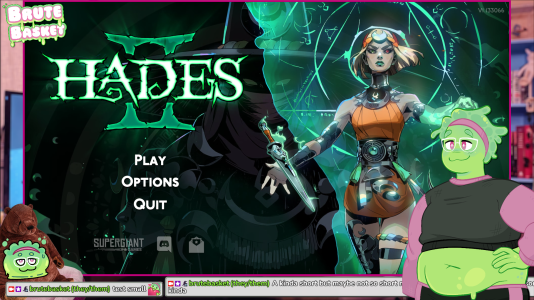
 

Attachments

  • Screenshot 2025-12-01 13-16-41.png
    Screenshot 2025-12-01 13-16-41.png
    2.1 MB · Views: 2
Might there be a way to cut off really long messages with a set character limit? So they kinda just ellipsis out? I've got my chat set up along the bottom of my screen and any long messages start covering things I don't want with how tall they'll get. My hack solution right now is just changing the max message width do like 3500. BUT that just means I have long messages taking up the entire width of my screen now pic included

This isn't a super big deal, but It'd be nice to know if I was just missing something obvious, thanks! ^^
that's a good point
uhhhh
there's probably some way of messing around with the css to get the text to clip into ellipsis if it overflows onto another line

something like
CSS:
overflow: hidden;
text-overflow: ellipsis;
white-space: nowrap;
added to the message css

I'll try to remember to make that a toggleable option in the next version of slime2
 
Omg thank you so much for the reply! I've never edited CSS before now so I'm not quite sure where to find the message css?
 
Back
Top